FondFontPress kit.
Install your TTF, OTF and TTC files in the iOS font library. Import ZIP collections, finish installation in Settings and use your fonts in compatible apps such as Pages and Keynote.
- Platform
- iPhone · iPad
- Availability
- Available on the App Store
- Official links
Deutsch
FondFont
Installiere deine TTF-, OTF- und TTC-Dateien in der iOS-Schriftbibliothek. Importiere ZIP-Sammlungen, schließe die Installation in Einstellungen ab und nutze die Schriften in kompatiblen Apps wie Pages und Keynote.
Prüfe deinen Text in verschiedenen Schriftgrößen.
Prüfe Zeichenabdeckung, Schriftfamilie, Stil und Lizenzinformationen.
Vergleiche Schriften mit demselben Beispieltext.
Öffne deine TTF-, OTF-, TTC- oder ZIP-Dateien vom gewohnten Speicherort.
FondFont erstellt ein Profil auf deinem Gerät. Erlaube den Download und schließe die Installation in den Einstellungen ab.
Wähle deine installierten Schriften in kompatiblen Apps wie Pages, Keynote, Word und PowerPoint.
FondFont erstellt Profile auf deinem Gerät. Deine Schriftdateien bleiben auf deinem Gerät. Du brauchst kein Konto und kein Abo.
FondFont installiert Schriften für kompatible Apps. Es ändert keine Schriften des iOS-Systems, der Tastatur oder des Home-Bildschirms. Es kann anderen Apps keine Unterstützung für eigene Schriften hinzufügen.
README.md
FondFont — Pressemappe
- Produktwebsite: https://you.foundme.boo/fondfont/de/
- Pressemappe: https://you.foundme.boo/fondfont/presskit/#de
- Plattform: iPhone · iPad
- Verfügbarkeit: Im App Store erhältlich
- Pressekontakt: [email protected]
Über die App
Installiere deine TTF-, OTF- und TTC-Dateien in der iOS-Schriftbibliothek. Importiere ZIP-Sammlungen, schließe die Installation in Einstellungen ab und nutze die Schriften in kompatiblen Apps wie Pages und Keynote.
Installiere deine TTF-, OTF- und TTC-Dateien in der iOS-Schriftbibliothek. Importiere ZIP-Sammlungen, schließe die Installation in Einstellungen ab und nutze die Schriften in kompatiblen Apps wie Pages und Keynote.
Prüfe deinen Text in verschiedenen Schriftgrößen.
Prüfe Zeichenabdeckung, Schriftfamilie, Stil und Lizenzinformationen.
Vergleiche Schriften mit demselben Beispieltext.
Öffne deine TTF-, OTF-, TTC- oder ZIP-Dateien vom gewohnten Speicherort.
FondFont erstellt ein Profil auf deinem Gerät. Erlaube den Download und schließe die Installation in den Einstellungen ab.
Wähle deine installierten Schriften in kompatiblen Apps wie Pages, Keynote, Word und PowerPoint.
FondFont erstellt Profile auf deinem Gerät. Deine Schriftdateien bleiben auf deinem Gerät. Du brauchst kein Konto und kein Abo.
FondFont installiert Schriften für kompatible Apps. Es ändert keine Schriften des iOS-Systems, der Tastatur oder des Home-Bildschirms. Es kann anderen Apps keine Unterstützung für eigene Schriften hinzufügen.
Offizielle Links
Bilder
App-Symbol
1024 × 1024 · PNG
Originales App-Symbol, 1024 × 1024 PNG. Grafik, Proportionen und Transparenz unverändert.
Screenshot
1206 × 2622 · PNG
Native Vorschau der Oberfläche in dieser Sprache; unveränderte Pixel.
Flache Vektorgrafik
1024.0 × 1024.0 · SVG
Flaches SVG aus den ursprünglichen Vektorformen und Ebenenpositionen. Native Glaseffekte, Beleuchtung und Systemsymbolmasken werden nicht nachgebildet; das vollständige native App-Symbol liegt als PNG vor.
Bild für soziale Medien
1200 × 630 · PNG
Werbegrafik, kein App-Screenshot.
Nutzung der Materialien
Für redaktionelle Berichte über dieses Produkt. Namen, Proportionen und Kontext erhalten; lazyapps nennen und auf die Produktwebsite verlinken. Rechte an Inhalten und Marken Dritter bleiben bestehen; dieses Paket erlaubt keine eigenständige Weiterverwendung. Für andere Nutzungen bitte Kontakt aufnehmen.
App-Symbol
1024 × 1024 · icon.png
Originales App-Symbol, 1024 × 1024 PNG. Grafik, Proportionen und Transparenz unverändert.
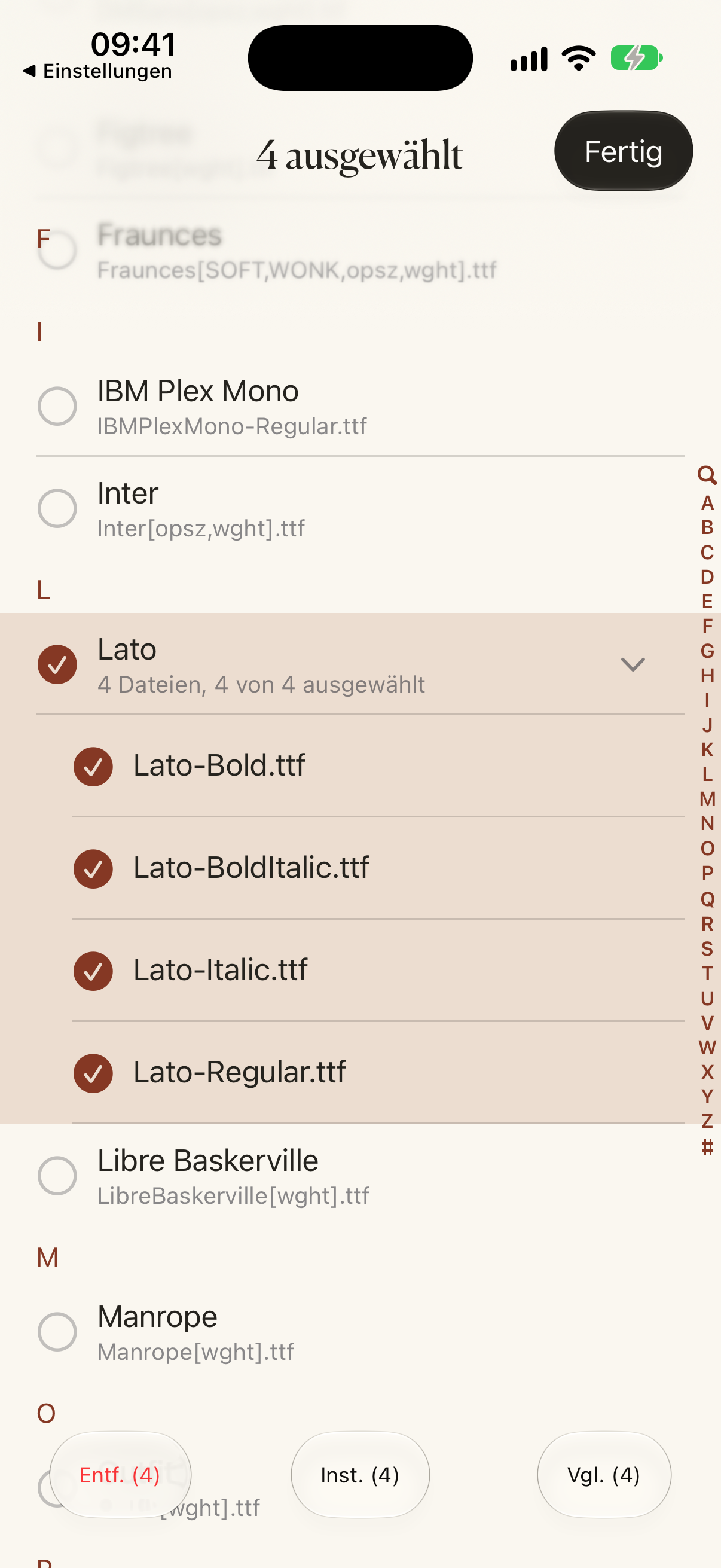
Screenshot
1206 × 2622 · de/font-selection.png
Native Vorschau der Oberfläche in dieser Sprache; unveränderte Pixel.

Flache Vektorgrafik
1024 × 1024 · artwork-flat.svg
Flaches SVG aus den ursprünglichen Vektorformen und Ebenenpositionen. Native Glaseffekte, Beleuchtung und Systemsymbolmasken werden nicht nachgebildet; das vollständige native App-Symbol liegt als PNG vor.
Bild für soziale Medien
1200 × 630 · social-card.png
Werbegrafik, kein App-Screenshot.
English
FondFont
Install your TTF, OTF and TTC files in the iOS font library. Import ZIP collections, finish installation in Settings and use your fonts in compatible apps such as Pages and Keynote.
Check your own text across different point sizes.
Inspect character coverage, family, style and license information.
Compare typefaces using the same sample text.
Open your TTF, OTF, TTC, or ZIP files from where you already keep them.
FondFont creates a profile on your device. Allow its download, then finish installation in Settings.
Choose your installed fonts in compatible apps such as Pages, Keynote, Word and PowerPoint.
FondFont creates profiles on your device. Your font files stay on your device. You do not need an account or subscription.
FondFont installs fonts for compatible apps. It cannot change the iOS system font, keyboard font or Home Screen font. It cannot add font support to other apps.
README.md
FondFont — Press Kit
- Website: https://you.foundme.boo/fondfont/en/
- Press Kit: https://you.foundme.boo/fondfont/presskit/#en
- Platform: iPhone · iPad
- Availability: Available on the App Store
- Media contact: [email protected]
About the app
Install your TTF, OTF and TTC files in the iOS font library. Import ZIP collections, finish installation in Settings and use your fonts in compatible apps such as Pages and Keynote.
Install your TTF, OTF and TTC files in the iOS font library. Import ZIP collections, finish installation in Settings and use your fonts in compatible apps such as Pages and Keynote.
Check your own text across different point sizes.
Inspect character coverage, family, style and license information.
Compare typefaces using the same sample text.
Open your TTF, OTF, TTC, or ZIP files from where you already keep them.
FondFont creates a profile on your device. Allow its download, then finish installation in Settings.
Choose your installed fonts in compatible apps such as Pages, Keynote, Word and PowerPoint.
FondFont creates profiles on your device. Your font files stay on your device. You do not need an account or subscription.
FondFont installs fonts for compatible apps. It cannot change the iOS system font, keyboard font or Home Screen font. It cannot add font support to other apps.
Official links
Images
App icon
1024 × 1024 · PNG
Original native App icon, 1024 × 1024 PNG. Preserves the app’s artwork, proportions and transparency.
Screenshot
1206 × 2622 · PNG
Original native capture from 2026-10-10, showing the current font-selection interface; no retouching. Font names shown in context do not grant rights to font files.
Flat vector artwork
1024.0 × 1024.0 · SVG
Flat SVG assembled from the original vector artwork and layer positions. Native glass, lighting and platform icon masks are not reproduced; use the PNG for the complete native app icon.
Social sharing image
1200 × 630 · PNG
Existing 1200 × 630 promotional artwork, not an app screenshot.
Using these materials
For editorial coverage of this product. Preserve names, proportions and context; credit lazyapps and link to the product website. Third-party content and trademarks retain their respective rights; this kit grants no standalone reuse rights. Contact us for other uses.
App icon
1024 × 1024 · icon.png
Original native App icon, 1024 × 1024 PNG. Preserves the app’s artwork, proportions and transparency.
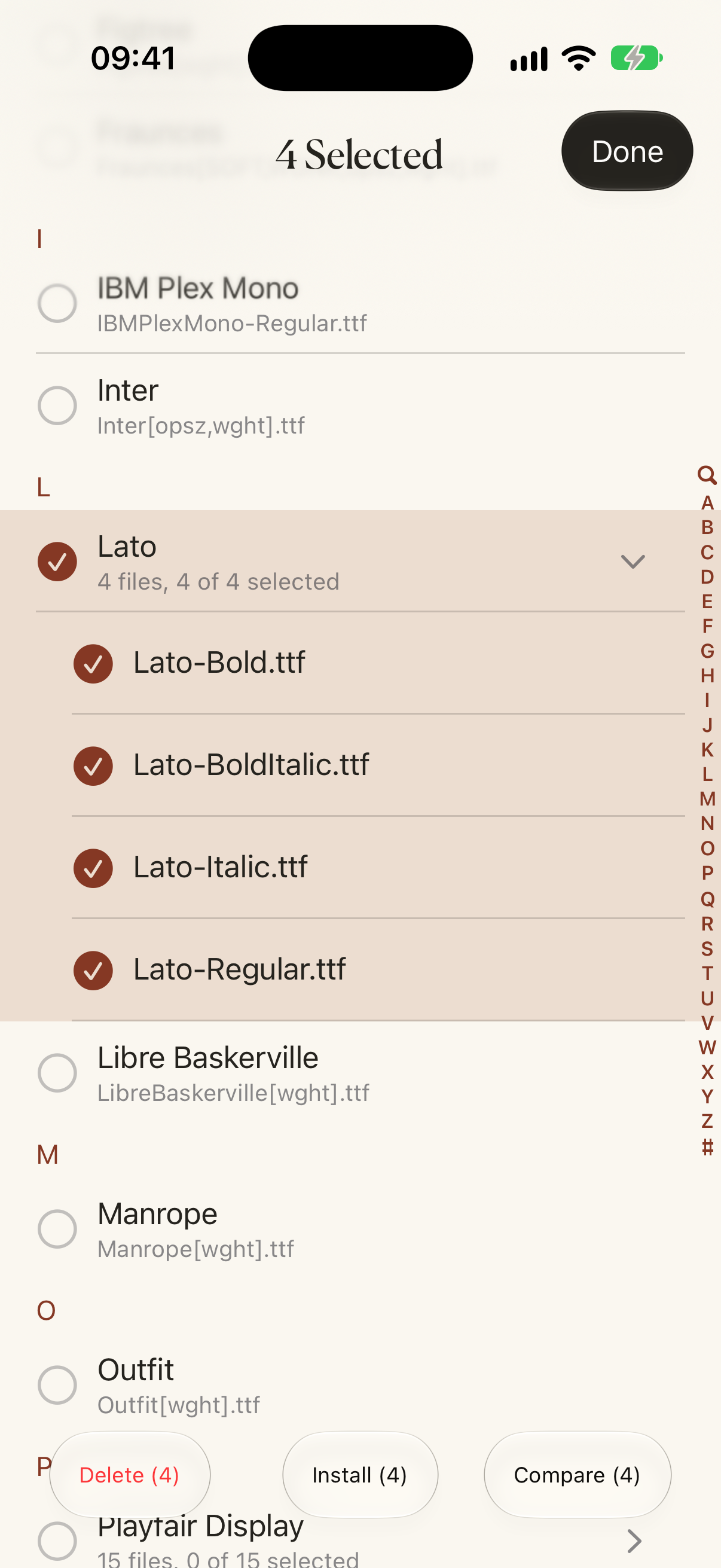
Screenshot
1206 × 2622 · en/font-selection.png
Original native capture from 2026-10-10, showing the current font-selection interface; no retouching. Font names shown in context do not grant rights to font files.
Flat vector artwork
1024 × 1024 · artwork-flat.svg
Flat SVG assembled from the original vector artwork and layer positions. Native glass, lighting and platform icon masks are not reproduced; use the PNG for the complete native app icon.
Social sharing image
1200 × 630 · social-card.png
Existing 1200 × 630 promotional artwork, not an app screenshot.
Français
FondFont
Installez vos fichiers TTF, OTF et TTC dans la bibliothèque de polices iOS. Importez des archives ZIP, terminez l’installation dans Réglages et utilisez vos polices dans les apps compatibles, comme Pages et Keynote.
Vérifiez votre texte à différentes tailles.
Consultez les caractères disponibles, la famille, le style et la licence.
Comparez les polices avec le même texte.
Ouvrez vos fichiers TTF, OTF, TTC ou ZIP depuis leur emplacement habituel.
FondFont crée un profil sur votre appareil. Autorisez son téléchargement, puis terminez l’installation dans Réglages.
Choisissez vos polices dans les apps compatibles, comme Pages, Keynote, Word et PowerPoint.
FondFont crée les profils sur votre appareil. Vos fichiers de polices restent sur votre appareil. Aucun compte ni abonnement n’est nécessaire.
FondFont installe des polices pour les apps compatibles. Il ne modifie pas les polices du système iOS, du clavier ou de l’écran d’accueil. Il ne rend pas les autres apps compatibles avec les polices personnalisées.
README.md
FondFont — Dossier de presse
- Site du produit: https://you.foundme.boo/fondfont/fr/
- Dossier de presse: https://you.foundme.boo/fondfont/presskit/#fr
- Plateforme: iPhone · iPad
- Disponibilité: Disponible sur l’App Store
- Contact presse: [email protected]
À propos de l’app
Installez vos fichiers TTF, OTF et TTC dans la bibliothèque de polices iOS. Importez des archives ZIP, terminez l’installation dans Réglages et utilisez vos polices dans les apps compatibles, comme Pages et Keynote.
Installez vos fichiers TTF, OTF et TTC dans la bibliothèque de polices iOS. Importez des archives ZIP, terminez l’installation dans Réglages et utilisez vos polices dans les apps compatibles, comme Pages et Keynote.
Vérifiez votre texte à différentes tailles.
Consultez les caractères disponibles, la famille, le style et la licence.
Comparez les polices avec le même texte.
Ouvrez vos fichiers TTF, OTF, TTC ou ZIP depuis leur emplacement habituel.
FondFont crée un profil sur votre appareil. Autorisez son téléchargement, puis terminez l’installation dans Réglages.
Choisissez vos polices dans les apps compatibles, comme Pages, Keynote, Word et PowerPoint.
FondFont crée les profils sur votre appareil. Vos fichiers de polices restent sur votre appareil. Aucun compte ni abonnement n’est nécessaire.
FondFont installe des polices pour les apps compatibles. Il ne modifie pas les polices du système iOS, du clavier ou de l’écran d’accueil. Il ne rend pas les autres apps compatibles avec les polices personnalisées.
Liens officiels
Images
Icône de l’app
1024 × 1024 · PNG
Icône native originale, PNG 1024 × 1024. Dessin, proportions et transparence préservés.
Capture d’écran
1206 × 2622 · PNG
Aperçu de l’interface native dans cette langue ; pixels inchangés.
Illustration vectorielle à plat
1024.0 × 1024.0 · SVG
SVG à plat assemblé à partir des formes vectorielles et positions de calques d’origine. Les effets de verre, l’éclairage et les masques d’icône du système ne sont pas reproduits ; utilisez le PNG pour l’icône native complète.
Image pour les réseaux sociaux
1200 × 630 · PNG
Visuel promotionnel, pas une capture d’écran de l’app.
Utilisation des éléments
Pour les articles présentant ce produit. Conserver les noms, proportions et contexte ; créditer lazyapps et ajouter un lien vers le site du produit. Les contenus et marques de tiers conservent leurs droits ; ce dossier n’autorise pas leur réutilisation séparée. Nous contacter pour tout autre usage.
Icône de l’app
1024 × 1024 · icon.png
Icône native originale, PNG 1024 × 1024. Dessin, proportions et transparence préservés.
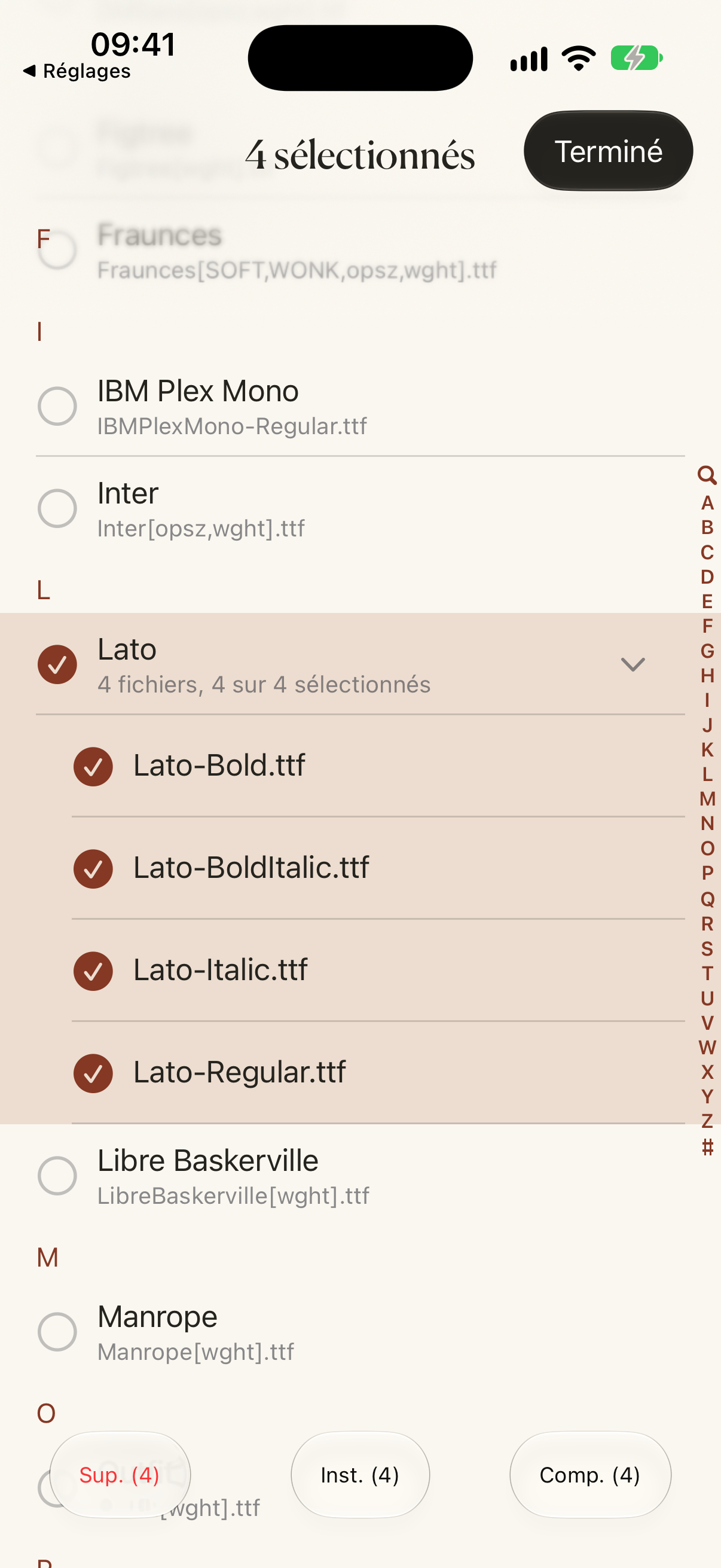
Capture d’écran
1206 × 2622 · fr/font-selection.png
Aperçu de l’interface native dans cette langue ; pixels inchangés.
Illustration vectorielle à plat
1024 × 1024 · artwork-flat.svg
SVG à plat assemblé à partir des formes vectorielles et positions de calques d’origine. Les effets de verre, l’éclairage et les masques d’icône du système ne sont pas reproduits ; utilisez le PNG pour l’icône native complète.
Image pour les réseaux sociaux
1200 × 630 · social-card.png
Visuel promotionnel, pas une capture d’écran de l’app.
日本語
FondFont
手持ちの TTF、OTF、TTC ファイルを iOS フォントライブラリにインストール。ZIP の読み込みに対応し、設定でインストールを完了すると Pages や Keynote などの対応アプリで使えます。
自分の文章で、サイズごとの見え方を確認。
文字の収録範囲、ファミリー、スタイル、ライセンス情報を確認。
同じ文章を使って、書体を並べて比較。
いつもの保存先から TTF・OTF・TTC・ZIP ファイルを開きます。
端末上でプロファイルを生成。ダウンロードを許可し、「設定」でインストールを完了します。
Pages、Keynote、Word、PowerPoint など、iOS のフォントライブラリに対応するアプリで選びます。
プロファイルは端末上で生成します。フォントファイルはアップロードしません。アカウントもサブスクリプションも不要です。
対応アプリ用のフォントをインストールします。iOS のシステム、キーボード、ホーム画面のフォントは変更できません。他のアプリにカスタムフォントの対応機能を追加することもできません。
README.md
FondFont — プレスキット
- 製品サイト: https://you.foundme.boo/fondfont/ja/
- プレスキット: https://you.foundme.boo/fondfont/presskit/#ja
- 対応環境: iPhone · iPad
- 提供状況: App Store で公開中
- メディアお問い合わせ: [email protected]
アプリについて
手持ちの TTF、OTF、TTC ファイルを iOS フォントライブラリにインストール。ZIP の読み込みに対応し、設定でインストールを完了すると Pages や Keynote などの対応アプリで使えます。
手持ちの TTF、OTF、TTC ファイルを iOS フォントライブラリにインストール。ZIP の読み込みに対応し、設定でインストールを完了すると Pages や Keynote などの対応アプリで使えます。
自分の文章で、サイズごとの見え方を確認。
文字の収録範囲、ファミリー、スタイル、ライセンス情報を確認。
同じ文章を使って、書体を並べて比較。
いつもの保存先から TTF・OTF・TTC・ZIP ファイルを開きます。
端末上でプロファイルを生成。ダウンロードを許可し、「設定」でインストールを完了します。
Pages、Keynote、Word、PowerPoint など、iOS のフォントライブラリに対応するアプリで選びます。
プロファイルは端末上で生成します。フォントファイルはアップロードしません。アカウントもサブスクリプションも不要です。
対応アプリ用のフォントをインストールします。iOS のシステム、キーボード、ホーム画面のフォントは変更できません。他のアプリにカスタムフォントの対応機能を追加することもできません。
公式リンク
画像素材
アプリアイコン
1024 × 1024 · PNG
原版の App アイコン。1024 × 1024 PNG。図柄・比率・透明部分を保持。
スクリーンショット
1206 × 2622 · PNG
この言語のネイティブ画面プレビュー。ピクセルの変更はありません。
フラットなベクター画像
1024.0 × 1024.0 · SVG
元のベクター図形とレイヤー位置から構成したフラットなSVGです。ネイティブのガラス効果、照明、システムのアイコンマスクは再現していません。完全なネイティブアプリアイコンにはPNGをご利用ください。
SNS共有画像
1200 × 630 · PNG
宣伝用画像であり、アプリ画面のスクリーンショットではありません。
素材の使用について
本製品を紹介する報道にご利用ください。名称、比率、製品の文脈を保持し、lazyapps のクレジットと製品サイトへのリンクを掲載してください。第三者のコンテンツや商標の権利は各権利者に帰属し、このキットはそれらの単独利用を許諾しません。他の用途はお問い合わせください。
アプリアイコン
1024 × 1024 · icon.png
原版の App アイコン。1024 × 1024 PNG。図柄・比率・透明部分を保持。
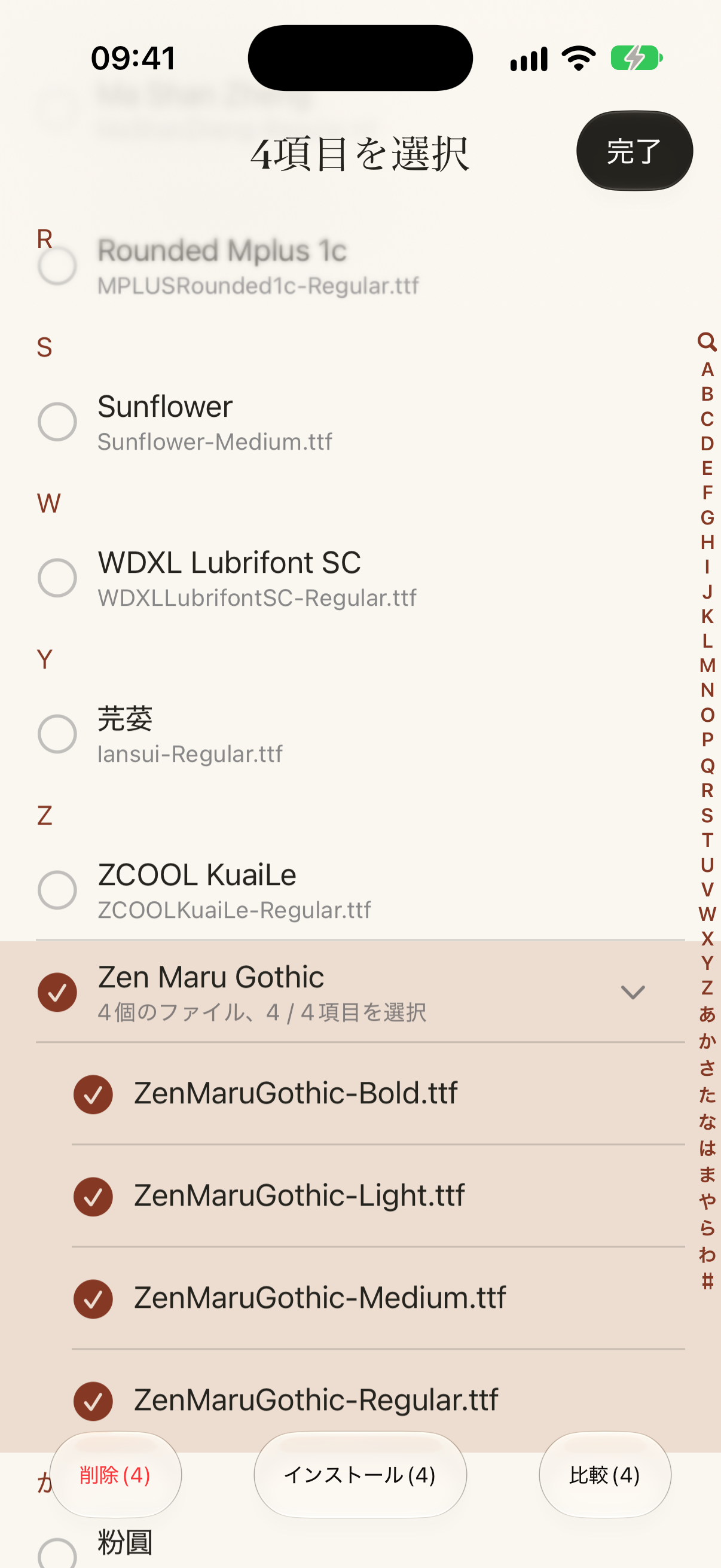
スクリーンショット
1206 × 2622 · ja/font-selection.png
この言語のネイティブ画面プレビュー。ピクセルの変更はありません。
フラットなベクター画像
1024 × 1024 · artwork-flat.svg
元のベクター図形とレイヤー位置から構成したフラットなSVGです。ネイティブのガラス効果、照明、システムのアイコンマスクは再現していません。完全なネイティブアプリアイコンにはPNGをご利用ください。
SNS共有画像
1200 × 630 · ja/social-card.png
宣伝用画像であり、アプリ画面のスクリーンショットではありません。
한국어
FondFont
가지고 있는 TTF, OTF, TTC 파일을 iOS 글꼴 라이브러리에 설치하세요. ZIP 가져오기를 지원하며, 설정에서 설치를 마치면 Pages와 Keynote 등 호환 앱에서 사용할 수 있습니다.
내 문구로 크기에 따른 폰트의 모습을 확인하세요.
문자 지원 범위, 패밀리, 스타일, 라이선스 정보를 확인하세요.
같은 문구로 여러 서체를 나란히 비교하세요.
평소 저장하는 곳에서 TTF, OTF, TTC 또는 ZIP 파일을 여세요.
기기에서 프로필을 생성합니다. 다운로드를 허용한 뒤 설정에서 설치를 완료하세요.
Pages, Keynote, Word, PowerPoint 등 iOS 폰트 보관함을 지원하는 앱에서 설치한 폰트를 선택하세요.
프로필은 기기에서 생성합니다. 폰트 파일은 업로드하지 않습니다. 계정이나 구독은 필요하지 않습니다.
호환 앱용 폰트를 설치합니다. iOS 시스템, 키보드, 홈 화면 폰트는 변경할 수 없습니다. 다른 앱에 사용자 설정 폰트 지원 기능을 추가할 수도 없습니다.
README.md
FondFont — 프레스 키트
- 제품 웹사이트: https://you.foundme.boo/fondfont/ko/
- 프레스 키트: https://you.foundme.boo/fondfont/presskit/#ko
- 플랫폼: iPhone · iPad
- 제공 상태: App Store에서 제공 중
- 언론 문의: [email protected]
앱 소개
가지고 있는 TTF, OTF, TTC 파일을 iOS 글꼴 라이브러리에 설치하세요. ZIP 가져오기를 지원하며, 설정에서 설치를 마치면 Pages와 Keynote 등 호환 앱에서 사용할 수 있습니다.
가지고 있는 TTF, OTF, TTC 파일을 iOS 글꼴 라이브러리에 설치하세요. ZIP 가져오기를 지원하며, 설정에서 설치를 마치면 Pages와 Keynote 등 호환 앱에서 사용할 수 있습니다.
내 문구로 크기에 따른 폰트의 모습을 확인하세요.
문자 지원 범위, 패밀리, 스타일, 라이선스 정보를 확인하세요.
같은 문구로 여러 서체를 나란히 비교하세요.
평소 저장하는 곳에서 TTF, OTF, TTC 또는 ZIP 파일을 여세요.
기기에서 프로필을 생성합니다. 다운로드를 허용한 뒤 설정에서 설치를 완료하세요.
Pages, Keynote, Word, PowerPoint 등 iOS 폰트 보관함을 지원하는 앱에서 설치한 폰트를 선택하세요.
프로필은 기기에서 생성합니다. 폰트 파일은 업로드하지 않습니다. 계정이나 구독은 필요하지 않습니다.
호환 앱용 폰트를 설치합니다. iOS 시스템, 키보드, 홈 화면 폰트는 변경할 수 없습니다. 다른 앱에 사용자 설정 폰트 지원 기능을 추가할 수도 없습니다.
공식 링크
이미지 자료
앱 아이콘
1024 × 1024 · PNG
원본 앱 아이콘, 1024 × 1024 PNG. 원본 그림, 비율, 투명 영역 유지.
스크린샷
1206 × 2622 · PNG
해당 언어의 네이티브 화면 미리보기이며 픽셀을 변경하지 않았습니다.
평면 벡터 이미지
1024.0 × 1024.0 · SVG
원본 벡터 도형과 레이어 위치로 구성한 평면 SVG입니다. 네이티브 유리 효과, 조명, 시스템 아이콘 마스크는 재현하지 않습니다. 완전한 네이티브 앱 아이콘은 PNG를 사용하세요.
소셜 공유 이미지
1200 × 630 · PNG
홍보 이미지로 앱 화면 스크린샷이 아닙니다.
자료 사용 안내
이 제품을 소개하는 보도에 사용하세요. 이름, 비율, 제품 맥락을 유지하고 lazyapps를 명시하며 제품 웹사이트를 링크하세요. 제3자 콘텐츠와 상표의 권리는 각 권리자에게 있으며 이 키트는 별도 재사용을 허용하지 않습니다. 다른 용도는 문의해 주세요.
앱 아이콘
1024 × 1024 · icon.png
원본 앱 아이콘, 1024 × 1024 PNG. 원본 그림, 비율, 투명 영역 유지.
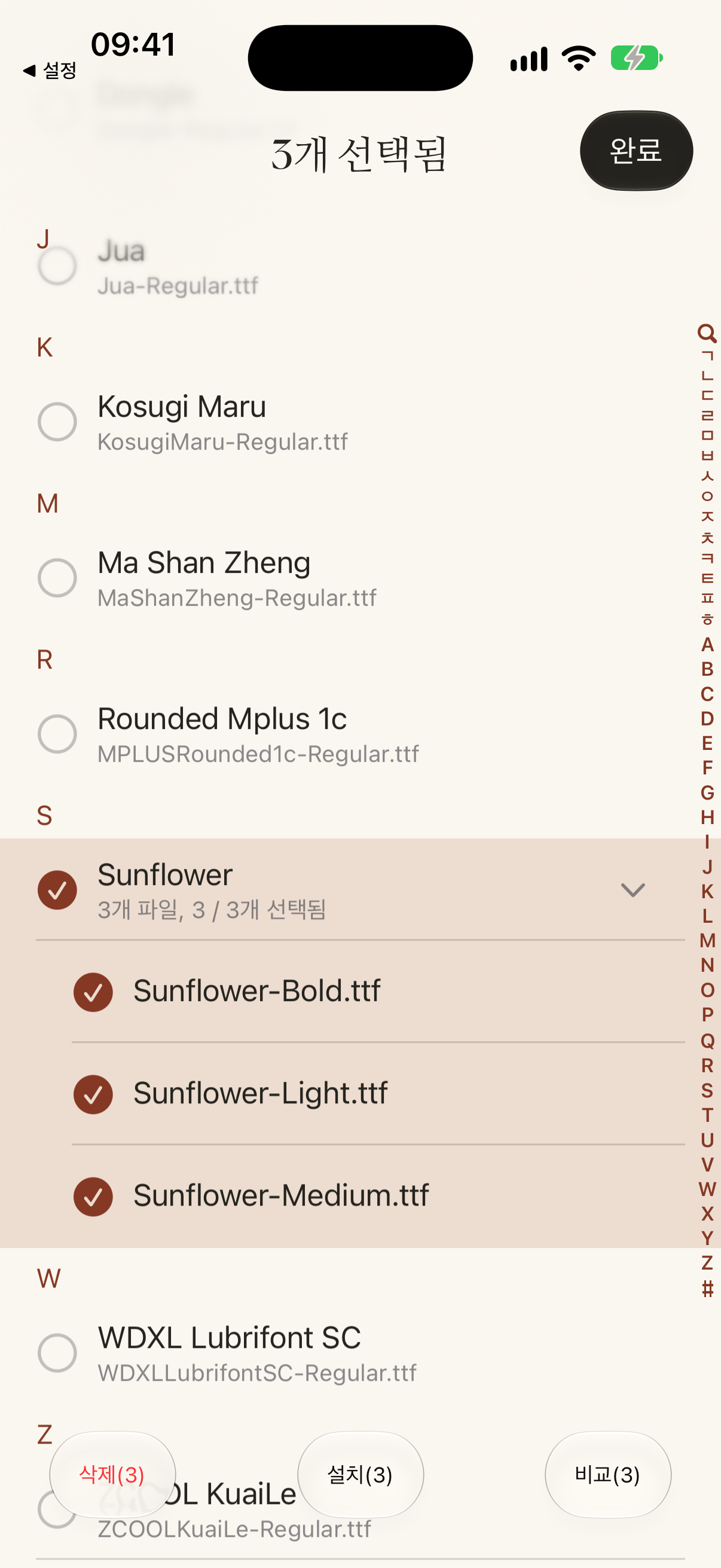
스크린샷
1206 × 2622 · ko/font-selection.png
해당 언어의 네이티브 화면 미리보기이며 픽셀을 변경하지 않았습니다.
평면 벡터 이미지
1024 × 1024 · artwork-flat.svg
원본 벡터 도형과 레이어 위치로 구성한 평면 SVG입니다. 네이티브 유리 효과, 조명, 시스템 아이콘 마스크는 재현하지 않습니다. 완전한 네이티브 앱 아이콘은 PNG를 사용하세요.
소셜 공유 이미지
1200 × 630 · ko/social-card.png
홍보 이미지로 앱 화면 스크린샷이 아닙니다.
简体中文
爱装字体 · FondFont
将自己的 TTF、OTF、TTC 字体安装到 iOS 字体库。支持导入 ZIP 字体包,在设置中完成安装后,可在 Pages、Keynote 等兼容 App 中使用。
用你的文字,查看字体在不同字号下的表现。
检查字符覆盖、字族、样式及授权信息。
同一段文字,直观比较不同字体。
从日常存放字体的位置,打开 TTF、OTF、TTC 或 ZIP 文件。
爱装字体在本机生成描述文件。允许下载后,前往「设置」完成安装。
在支持 iOS 字体库的 App 中选择已安装字体,例如 Pages、Keynote、Word 和 PowerPoint。
爱装字体在本机生成描述文件。字体文件不会上传。无需账号或订阅。
爱装字体为兼容 App 安装字体。它不能修改 iOS 系统字体、键盘字体或主屏幕字体。它不能让其他 App 获得自定义字体支持。
README.md
爱装字体 · FondFont — 媒体资料
- 产品网站: https://you.foundme.boo/fondfont/zh-hans/
- 媒体资料页: https://you.foundme.boo/fondfont/presskit/#zh-Hans
- 平台: iPhone · iPad
- 发布状态: 已在 App Store 上架
- 媒体联系: [email protected]
产品简介
将自己的 TTF、OTF、TTC 字体安装到 iOS 字体库。支持导入 ZIP 字体包,在设置中完成安装后,可在 Pages、Keynote 等兼容 App 中使用。
将自己的 TTF、OTF、TTC 字体安装到 iOS 字体库。支持导入 ZIP 字体包,在设置中完成安装后,可在 Pages、Keynote 等兼容 App 中使用。
用你的文字,查看字体在不同字号下的表现。
检查字符覆盖、字族、样式及授权信息。
同一段文字,直观比较不同字体。
从日常存放字体的位置,打开 TTF、OTF、TTC 或 ZIP 文件。
爱装字体在本机生成描述文件。允许下载后,前往「设置」完成安装。
在支持 iOS 字体库的 App 中选择已安装字体,例如 Pages、Keynote、Word 和 PowerPoint。
爱装字体在本机生成描述文件。字体文件不会上传。无需账号或订阅。
爱装字体为兼容 App 安装字体。它不能修改 iOS 系统字体、键盘字体或主屏幕字体。它不能让其他 App 获得自定义字体支持。
官方链接
图片素材
App 图标
1024 × 1024 · PNG
原版 App 图标,1024 × 1024 PNG。保留原版图案、比例与透明边角。
界面截图
1206 × 2622 · PNG
2026-10-10 拍摄的原始原生界面截图,展示当前字体选择界面,未经修饰。截图中的字体名称仅用于展示使用语境,不授予字体文件的使用权。
平面矢量图
1024.0 × 1024.0 · SVG
由原版矢量图案和图层位置组合的平面 SVG,不重现原生玻璃、光照或系统图标裁切。完整原生 App 图标请使用 PNG。
社交分享图
1200 × 630 · PNG
宣传图片,不是 App 界面截图。
使用说明
这些素材用于介绍本产品的媒体报道。请保留名称、比例与产品语境,署名 lazyapps 并链接产品网站。第三方内容与商标保留各自权利;本资料包不授予其独立使用权。如需其他用途,请联系我们。
App 图标
1024 × 1024 · icon.png
原版 App 图标,1024 × 1024 PNG。保留原版图案、比例与透明边角。
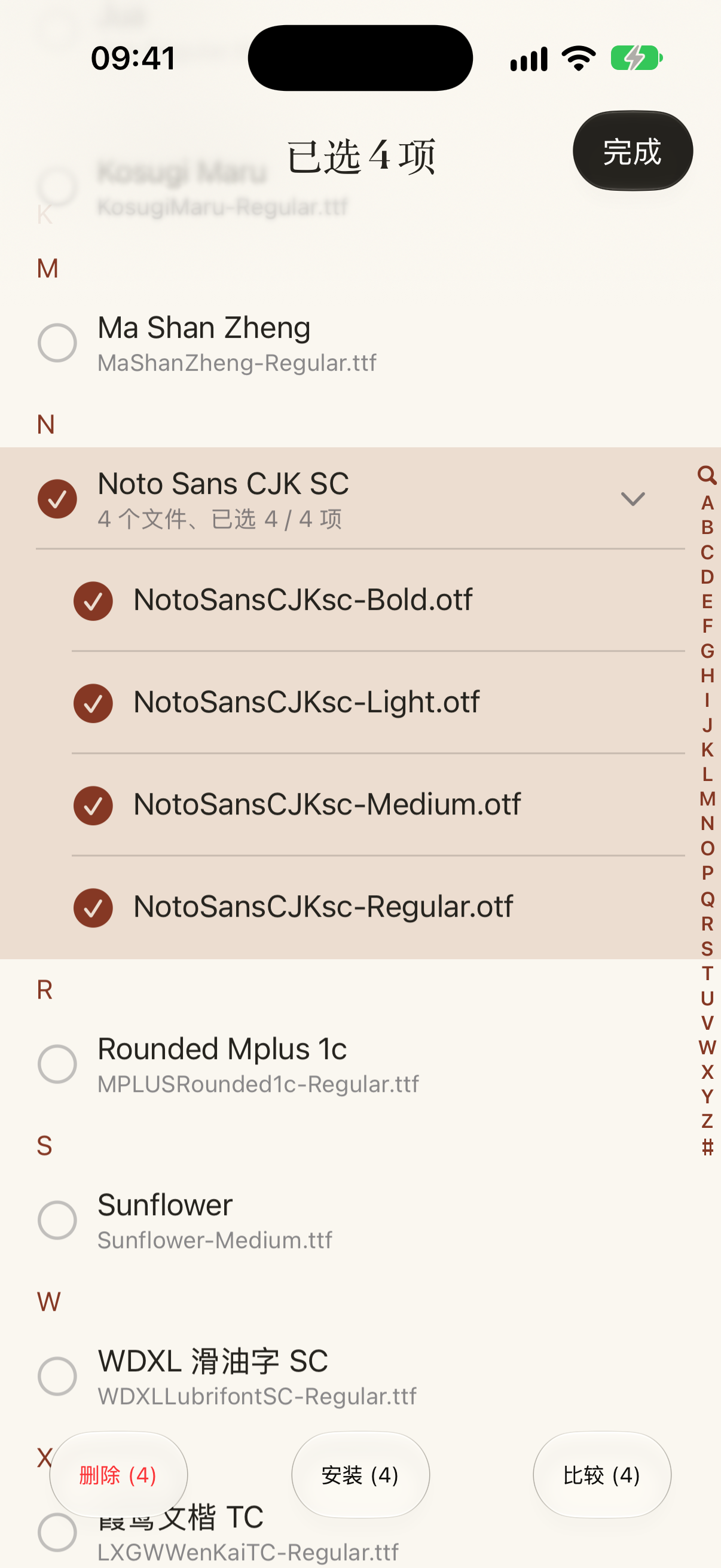
界面截图
1206 × 2622 · zh-Hans/font-selection.png
2026-10-10 拍摄的原始原生界面截图,展示当前字体选择界面,未经修饰。截图中的字体名称仅用于展示使用语境,不授予字体文件的使用权。
平面矢量图
1024 × 1024 · artwork-flat.svg
由原版矢量图案和图层位置组合的平面 SVG,不重现原生玻璃、光照或系统图标裁切。完整原生 App 图标请使用 PNG。
社交分享图
1200 × 630 · zh-Hans/social-card.png
宣传图片,不是 App 界面截图。
繁體中文
愛裝字體 · FondFont
將自己的 TTF、OTF、TTC 字型安裝到 iOS 字型庫。支援匯入 ZIP 字型包,在設定中完成安裝後,可在 Pages、Keynote 等相容 App 中使用。
用你的文字,查看字體在不同字級下的表現。
檢查字元涵蓋範圍、字體系列、樣式與授權資訊。
用同一段文字,直觀比較不同字體。
從日常存放字體的位置,開啟 TTF、OTF、TTC 或 ZIP 檔案。
愛裝字體在裝置上產生描述檔。允許下載後,前往「設定」完成安裝。
在支援 iOS 字體庫的 App 中選擇已安裝字體,例如 Pages、Keynote、Word 和 PowerPoint。
愛裝字體在裝置上產生描述檔。字體檔案不會上傳。無需帳號或訂閱。
愛裝字體為相容 App 安裝字體。它不能修改 iOS 系統字體、鍵盤字體或主畫面字體。它不能讓其他 App 獲得自訂字體支援。
README.md
愛裝字體 · FondFont — 媒體資料
- 產品網站: https://you.foundme.boo/fondfont/zh-hant/
- 媒體資料頁: https://you.foundme.boo/fondfont/presskit/#zh-Hant
- 平台: iPhone · iPad
- 發佈狀態: 已在 App Store 上架
- 媒體聯絡: [email protected]
產品簡介
將自己的 TTF、OTF、TTC 字型安裝到 iOS 字型庫。支援匯入 ZIP 字型包,在設定中完成安裝後,可在 Pages、Keynote 等相容 App 中使用。
將自己的 TTF、OTF、TTC 字型安裝到 iOS 字型庫。支援匯入 ZIP 字型包,在設定中完成安裝後,可在 Pages、Keynote 等相容 App 中使用。
用你的文字,查看字體在不同字級下的表現。
檢查字元涵蓋範圍、字體系列、樣式與授權資訊。
用同一段文字,直觀比較不同字體。
從日常存放字體的位置,開啟 TTF、OTF、TTC 或 ZIP 檔案。
愛裝字體在裝置上產生描述檔。允許下載後,前往「設定」完成安裝。
在支援 iOS 字體庫的 App 中選擇已安裝字體,例如 Pages、Keynote、Word 和 PowerPoint。
愛裝字體在裝置上產生描述檔。字體檔案不會上傳。無需帳號或訂閱。
愛裝字體為相容 App 安裝字體。它不能修改 iOS 系統字體、鍵盤字體或主畫面字體。它不能讓其他 App 獲得自訂字體支援。
官方連結
圖片素材
App 圖示
1024 × 1024 · PNG
原版 App 圖示,1024 × 1024 PNG。保留原版圖案、比例與透明邊角。
介面截圖
1206 × 2622 · PNG
對應語言的原生介面預覽,像素保持原樣。
平面向量圖
1024.0 × 1024.0 · SVG
由原版向量圖案和圖層位置組合的平面 SVG,不重現原生玻璃、光照或系統圖示裁切。完整原生 App 圖示請使用 PNG。
社群分享圖
1200 × 630 · PNG
宣傳圖片,不是 App 介面截圖。
使用說明
這些素材用於介紹本產品的媒體報導。請保留名稱、比例與產品語境,署名 lazyapps 並連結產品網站。第三方內容與商標保留各自權利;本資料包不授予其獨立使用權。如需其他用途,請聯絡我們。
App 圖示
1024 × 1024 · icon.png
原版 App 圖示,1024 × 1024 PNG。保留原版圖案、比例與透明邊角。
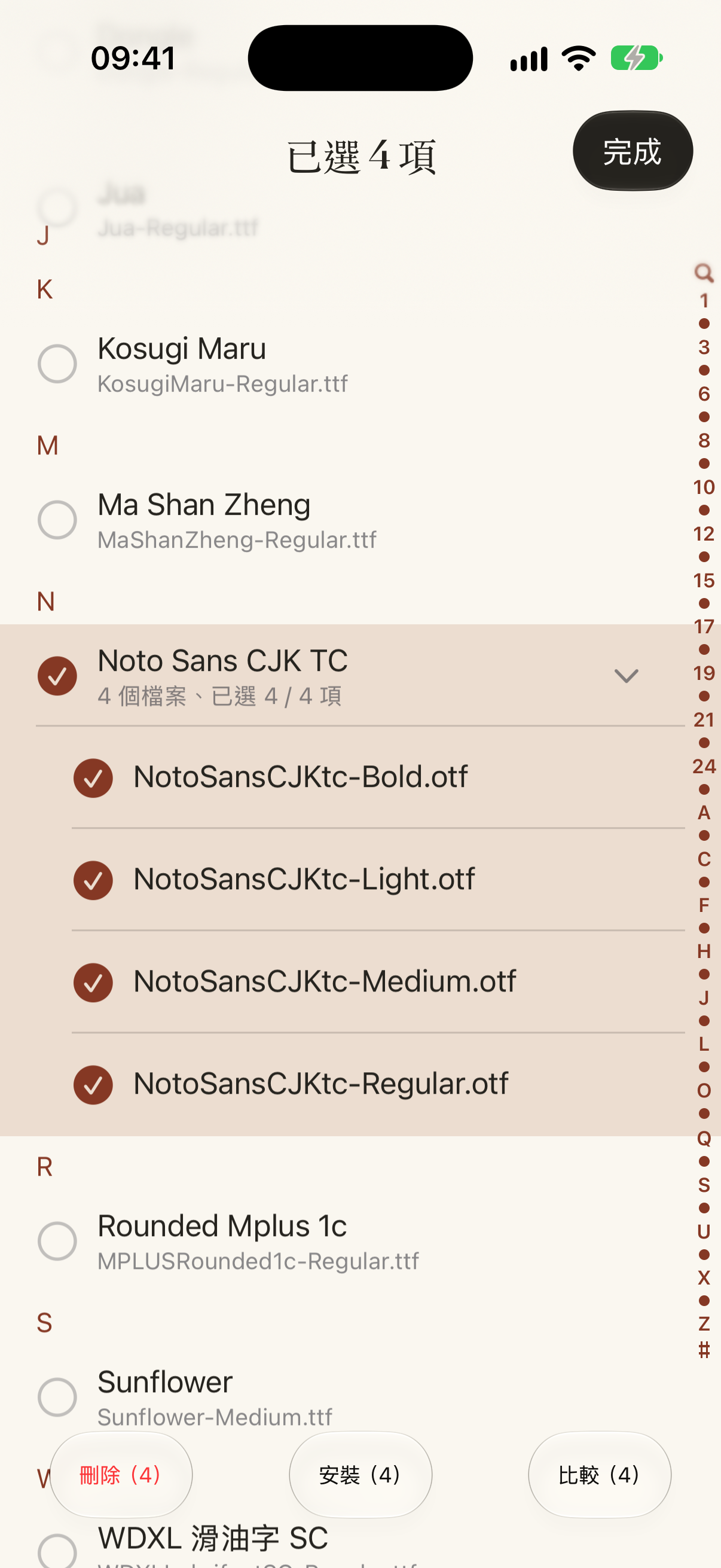
介面截圖
1206 × 2622 · zh-Hant/font-selection.png
對應語言的原生介面預覽,像素保持原樣。
平面向量圖
1024 × 1024 · artwork-flat.svg
由原版向量圖案和圖層位置組合的平面 SVG,不重現原生玻璃、光照或系統圖示裁切。完整原生 App 圖示請使用 PNG。
社群分享圖
1200 × 630 · zh-Hant/social-card.png
宣傳圖片,不是 App 介面截圖。